React Fundamentals: Components, JSX, State, and Re-rendering
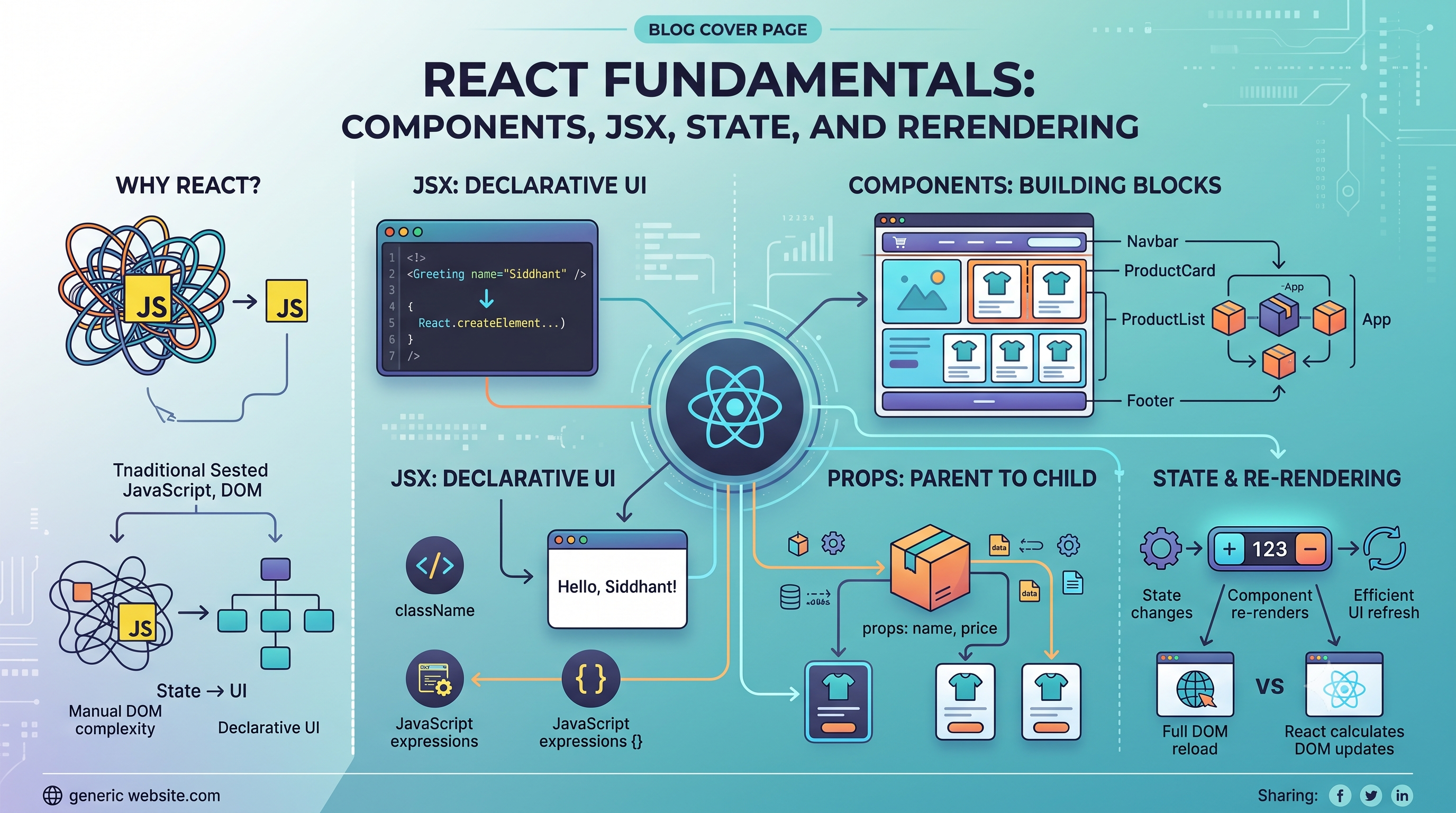
Why did developers create React when JavaScript already existed?
JavaScript was already capable of manipulating the DOM, handling events, updating content, and creating interactive web pages.
So why did we need another tool?
The answer is complexity.
As web applications became more interactive, manually managing every DOM update became increasingly difficult. Developers needed a better way to organize UI logic, reuse components, and keep the interface synchronized with application data.
That's where React comes in.
React provides a component-driven and declarative approach to building user interfaces.
Instead of manually telling the browser how to update every element, you describe what the UI should look like for a given state, and React handles the process of updating the interface.
To understand React properly, we need to build the mental model from the ground up.
1. Why React Exists
Let's start with a simple example.
Suppose you have a button:
<button id="counter">Count: 0</button>
Using traditional JavaScript, you might write:
let count = 0;

const button = document.getElementById("counter");

button.addEventListener("click", () => {
  count++;

  button.textContent = `Count: ${count}`;
});
This works perfectly.
But now imagine a dashboard with:
A navigation bar
User profile
Notifications
Charts
Tables
Filters
Forms
Modals
Multiple interactive widgets
Now you have to manually keep different parts of the DOM synchronized with changing application data.
As the UI becomes more complex, the number of relationships between data and DOM elements grows.
The problem isn't that JavaScript can't handle it.
The problem is that managing the complexity manually becomes difficult.
React's Approach
React encourages you to think about the UI as a function of data.
Conceptually:
State
  ↓
UI
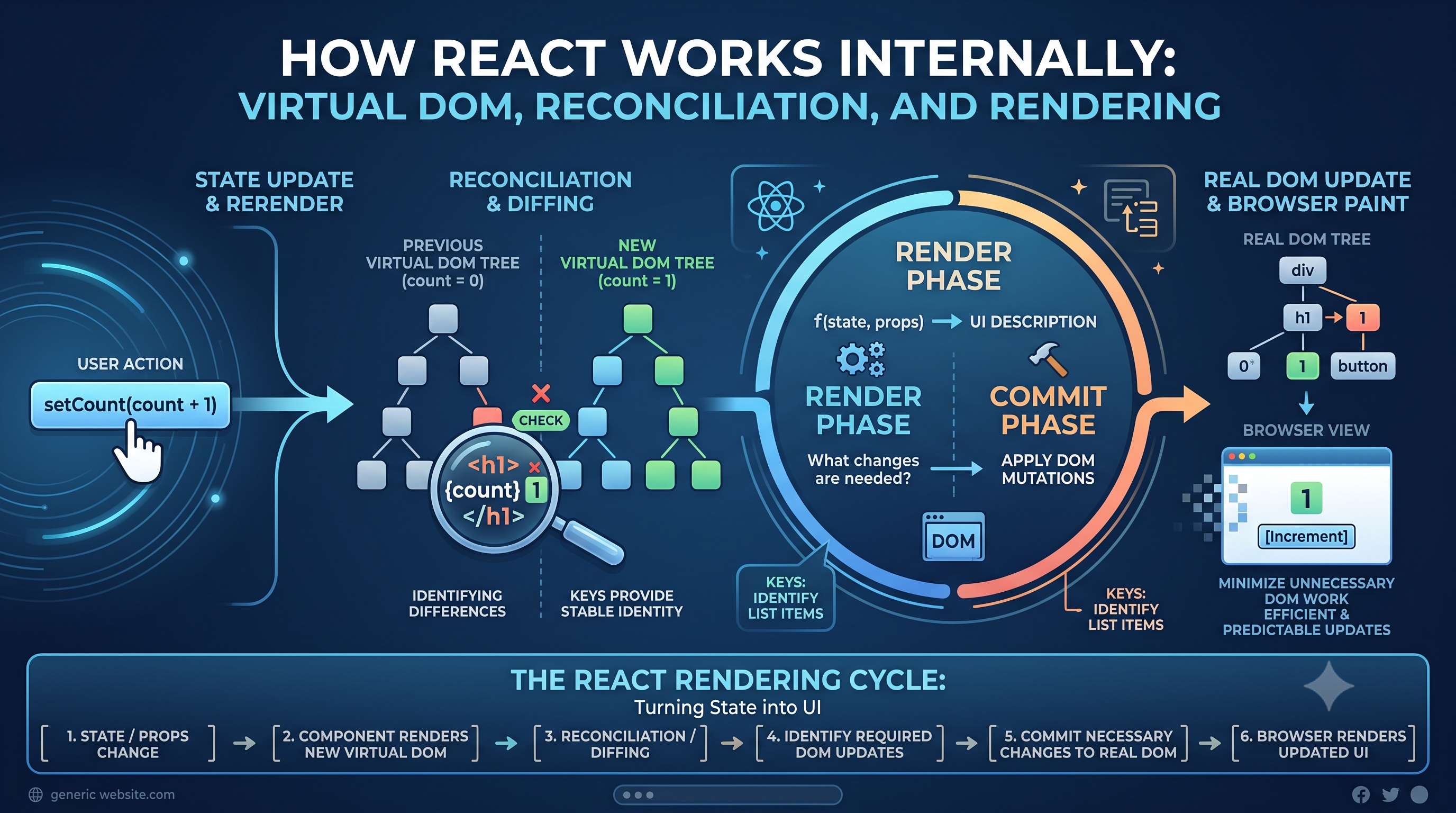
When the state changes:
State changes
     ↓
React renders the component
     ↓
React determines what changed
     ↓
UI is updated
You describe the UI.
React manages the updates.
This is one of the biggest shifts in thinking when moving from traditional DOM manipulation to React.
2. Understanding JSX
If you've seen React code, you've probably encountered something like this:
function Greeting() {
  return <h1>Hello, Siddhant!</h1>;
}
At first glance, this looks like HTML inside JavaScript.
It's actually JSX.
JSX is a syntax extension that allows developers to describe UI using a syntax that looks similar to HTML while writing JavaScript.
Why JSX?
Without JSX, creating UI elements would be more verbose.
You could write:
const heading = React.createElement(
  "h1",
  null,
  "Hello, Siddhant!"
);
With JSX:
const heading = <h1>Hello, Siddhant!</h1>;
The second version is generally easier to read and reason about.
JSX makes the relationship between JavaScript logic and the UI structure much more visible.
JSX vs HTML
JSX looks similar to HTML, but it isn't HTML.
For example, JSX uses JavaScript-style naming in several places:
<button className="primary">
  Submit
</button>
Instead of:
<button class="primary">
  Submit
</button>
You can also embed JavaScript expressions inside JSX using curly braces:
function Greeting() {
  const name = "Siddhant";

  return <h1>Hello, {name}!</h1>;
}
The expression inside {} is evaluated and its result becomes part of the rendered UI.
This makes JSX powerful because UI and JavaScript logic can work together naturally.
JSX Compilation
Browsers don't directly understand JSX.
A build tool transforms JSX into JavaScript that React can work with.
Conceptually:
JSX
 ↓
Transformation
 ↓
JavaScript
 ↓
Browser
So when you write:
<h1>Hello</h1>
the tooling transforms it into JavaScript representing that UI.
You don't normally need to perform this transformation manually. Modern React tooling handles it as part of the development and build process.
3. Components in React
Components are one of React's most important ideas.
A component is a reusable building block of the user interface.
Instead of thinking about an application as one giant page, we can break it into smaller pieces.
For example, an e-commerce application might look like:
App
 ├── Navbar
 ├── ProductList
 │    ├── ProductCard
 │    ├── ProductCard
 │    └── ProductCard
 ├── Cart
 └── Footer
Each component has a specific responsibility.
Function Components
Modern React applications primarily use function components.
For example:
function Welcome() {
  return <h1>Welcome to the application</h1>;
}
A component can also contain other components:
function App() {
  return (
    <>
      <Navbar />
      <Welcome />
      <Footer />
    </>
  );
}
This is called component composition.
Instead of building one enormous component, we compose smaller components together.
Why Componentization Matters
Imagine a social media application.
A post might contain:
Post
 ├── UserAvatar
 ├── UserName
 ├── PostContent
 ├── LikeButton
 ├── CommentButton
 └── ShareButton
If every post follows the same structure, we can create one reusable Post component.
Then:
<Post />
<Post />
<Post />
can represent multiple posts.
This gives us:
Reusability
Better organization
Easier maintenance
Clearer responsibilities
Easier testing and debugging
The goal isn't to create as many components as possible.
The goal is to create components with clear and meaningful responsibilities.
4. Props in React
Components often need data from their parent.
This is where props come in.
Props are values passed from one component to another, typically from parent to child.
For example:
function ProductCard({ name, price }) {
  return (
    <div>
      <h2>{name}</h2>
      <p>₹{price}</p>
    </div>
  );
}
The parent can provide the data:
<ProductCard
  name="Mechanical Keyboard"
  price={2499}
/>
Conceptually:
Parent
  │
  │ props
  ↓
Child
Props Make Components Reusable
Without props, we might hardcode:
function ProductCard() {
  return (
    <div>
      <h2>Mechanical Keyboard</h2>
      <p>₹2499</p>
    </div>
  );
}
Now the component only represents one product.
With props:
function ProductCard({ name, price }) {
  return (
    <div>
      <h2>{name}</h2>
      <p>₹{price}</p>
    </div>
  );
}
the same component can represent many products.
<ProductCard name="Keyboard" price={2499} />
<ProductCard name="Mouse" price={999} />
<ProductCard name="Monitor" price={14999} />
That's the real value of component-driven development.
Props Are Read-Only
A child component should not directly modify its props.
For example, this is not the intended pattern:
function Profile({ user }) {
  user.name = "New Name";
}
Props represent data received from the parent.
If the child needs to cause a change, the parent can provide an appropriate callback.
This maintains a predictable data flow:
Parent
  ↓
Props
  ↓
Child
React generally encourages this one-way flow of data.
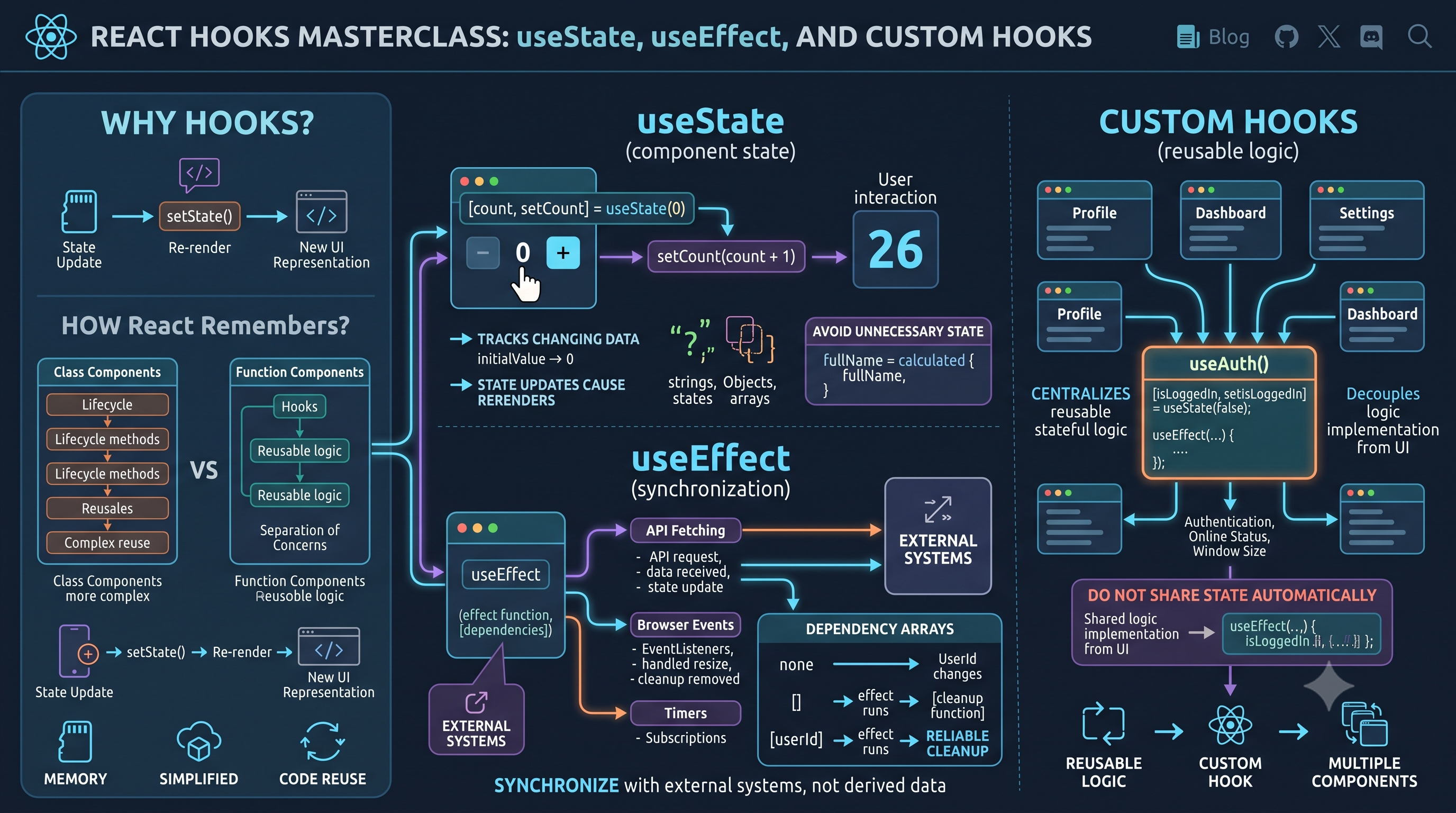
5. State in React
Props represent data received from outside the component.
State represents data that a component needs to remember and that can change over time.
For example, a counter:
function Counter() {
  const [count, setCount] = useState(0);

  return (
    <button onClick={() => setCount(count + 1)}>
      Count: {count}
    </button>
  );
}
Here:
count
  ↓
Current state

setCount
  ↓
Updates the state
The component uses state to determine what should be displayed.
Why State Exists
Consider a user profile page.
The user might be able to switch between:
Profile
Posts
Followers
Settings
The currently selected tab is state.
const [activeTab, setActiveTab] = useState("profile");
When the user selects "posts":
User clicks Posts
      ↓
setActiveTab("posts")
      ↓
State changes
      ↓
Component renders again
      ↓
UI displays Posts
State allows the UI to respond to changing data.
6. Understanding Re-rendering
This is one of the most important React concepts.
What happens when state changes?
React re-renders the component to determine what the UI should look like with the new state.
Consider:
function Counter() {
  const [count, setCount] = useState(0);

  return (
    <button onClick={() => setCount(count + 1)}>
      Count: {count}
    </button>
  );
}
Initially:
count = 0
     ↓
<button>Count: 0</button>
After clicking:
count = 1
     ↓
Component renders again
     ↓
<button>Count: 1</button>
React handles the UI update.
You don't need to manually find the button and change its text.
What Causes a Re-render?
Several things can cause a component to render again.
A major one is a state update.
For example:
setCount(count + 1);
Changes to props can also cause a component to render as part of React processing the updated component tree.
A parent rendering can also result in its child components being rendered again.
The important thing to understand is that React's rendering process is how it determines what the UI should look like after changes.
Re-render Does Not Mean "The Entire DOM Changes"
This is an important beginner misconception.
Suppose only the counter value changes:
Old UI:
Count: 0

New UI:
Count: 1
React doesn't blindly recreate the entire webpage.
It calculates what changed and commits the necessary DOM updates.
Conceptually:
State update
     ↓
React render
     ↓
Determine UI changes
     ↓
Commit necessary DOM updates
This distinction becomes especially important when we later talk about React performance.
7. React's Declarative Nature
React is often described as declarative.
But what does that actually mean?
Let's compare imperative and declarative thinking.
Imperative Programming
Imperative programming focuses on how something should happen.
For example:
const button = document.querySelector("#counter");

button.textContent = "Count: 1";
You're explicitly telling the browser:
Find this element and change its text.
You are describing the steps required to update the interface.
Declarative Programming
React encourages you to describe what the UI should look like.
<button>
  Count: {count}
</button>
You aren't manually saying:
Find the button
 ↓
Read its current text
 ↓
Replace the text
Instead, you say:
The button should display the current value of
count.
React handles the update process.
Why This Helps
As applications become more complex, manually managing every UI transition becomes difficult.
Declarative rendering gives us a simpler mental model:
Current State
     ↓
Current UI
If the state changes, the UI should reflect the new state.
This makes UI behavior easier to reason about.
8. Component Tree Architecture
React applications are naturally represented as component trees.
Consider a dashboard:
App
│
├── Navbar
│    ├── Logo
│    └── UserMenu
│
├── Sidebar
│    ├── Navigation
│    └── Settings
│
└── Dashboard
     ├── StatsCard
     ├── Chart
     └── ActivityTable
This tree represents the structure of the application.
The top-level component is the parent.
Components underneath it are children.
Data Flow
Data generally flows from parent to child through props.
App
 ↓ props
Dashboard
 ↓ props
StatsCard
This gives React applications a predictable direction of data flow.
When a child needs to communicate an action back to a parent, the parent can pass a function as a prop.
Conceptually:
Parent
 ↓ data
Child
 ↓ callback
Parent
This pattern allows components to remain reusable while still communicating with each other.
9. Common Beginner Mistakes
Learning React isn't just about knowing its APIs.
It's also about avoiding patterns that make applications harder to maintain.
Mutating State Directly
Suppose:
const [user, setUser] = useState({
  name: "Siddhant"
});
A common mistake is:
user.name = "Rahul";
Instead, create a new value and update the state:
setUser({
  ...user,
  name: "Rahul"
});
State should be treated as data that React manages through state updates, rather than something you manually mutate.
Confusing Props and State
Remember:
Props
↓
Received from parent

State
↓
Managed by component
Props help make components configurable.
State allows components to remember changing information.
Overusing State
Not every value needs to be state.
For example:
const firstName = "Siddhant";
doesn't need useState if it never changes.
Adding unnecessary state can make components harder to understand.
Ask:
Does this value actually change over time and should that change affect the UI?
If not, it probably doesn't need to be state.
Creating Huge Components
A component containing hundreds of lines of unrelated UI logic becomes difficult to maintain.
Instead of:
Dashboard.jsx
 └── Everything
consider:
Dashboard
 ├── Header
 ├── Stats
 ├── Chart
 ├── Activity
 └── RecentOrders
Componentization should reflect meaningful responsibilities.
Poor Component Organization
Components should have clear purposes.
A component called Dashboard shouldn't necessarily contain all the logic for authentication, product management, charts, notifications, and settings.
Breaking responsibilities into meaningful components makes the application easier to understand and change.
10. Building Applications with Components
The most important React skill isn't memorizing hooks.
It's learning to think in components.
Suppose you're building an e-commerce product page.
Instead of thinking:
"I need to build a product page."
Break the UI down:
ProductPage
│
├── ProductImage
├── ProductInfo
│    ├── ProductTitle
│    ├── ProductPrice
│    └── ProductRating
│
├── QuantitySelector
├── AddToCartButton
└── Reviews
Now each part has a clear responsibility.
Reusable Components
Some components may be reused throughout the application.
For example:
Button
Card
Modal
Input
Avatar
Badge
These components can accept props to customize their behavior.
<Button variant="primary">
  Buy Now
</Button>

<Button variant="secondary">
  Add to Wishlist
</Button>
The same underlying component can support different use cases.
A Simple React Mental Model
You can summarize the fundamentals with this flow:
              Components
                  ↓
              Build the UI
                  ↓
              Props + State
                  ↓
            Component renders
                  ↓
             State changes
                  ↓
              Re-render
                  ↓
       React determines necessary
             UI updates
And the data flow looks like:
Parent
  │
  ├── Props ─────→ Child
  │
  └── State
This simple mental model explains a surprisingly large part of React.
Final Thoughts
React wasn't created because JavaScript couldn't build interactive interfaces.
JavaScript could.
React became valuable because managing complex interfaces manually becomes difficult as applications grow.
React provides a different way of thinking about UI development:
JSX gives us a readable way to describe UI.
Components allow us to break interfaces into reusable building blocks.
Props allow components to receive data from their parents.
State allows components to manage changing information.
Re-rendering allows React to recalculate the UI when relevant data changes.
And declarative rendering lets us describe what the UI should look like instead of manually managing every DOM update.
The most important mental model is:
UI is a representation of state.
When the state changes, React determines what the UI should look like now.
Once you understand that relationship, React stops feeling like a collection of APIs to memorize and starts becoming a way of thinking about user interfaces.
And that foundation is far more important than knowing every React hook.