Mastering TypeScript: Interfaces, Generics, Unions Explained
If JavaScript works, why was TypeScript created?
JavaScript is flexible, easy to start with, and powerful enough to build almost anything on the web. But as applications grow, that flexibility can also become a source of problems.
A small JavaScript application may have a few files and a handful of functions. A large application can have hundreds of components, APIs, services, database models, and developers working on the same codebase.
At that scale, knowing what kind of data a function expects becomes increasingly important.
Consider this JavaScript function:
function calculateTotal(price, quantity) {
  return price * quantity;
}
It looks simple.
But what happens if someone calls:
calculateTotal("100", "2");
JavaScript may perform type coercion instead of immediately telling you that the function received the wrong types.
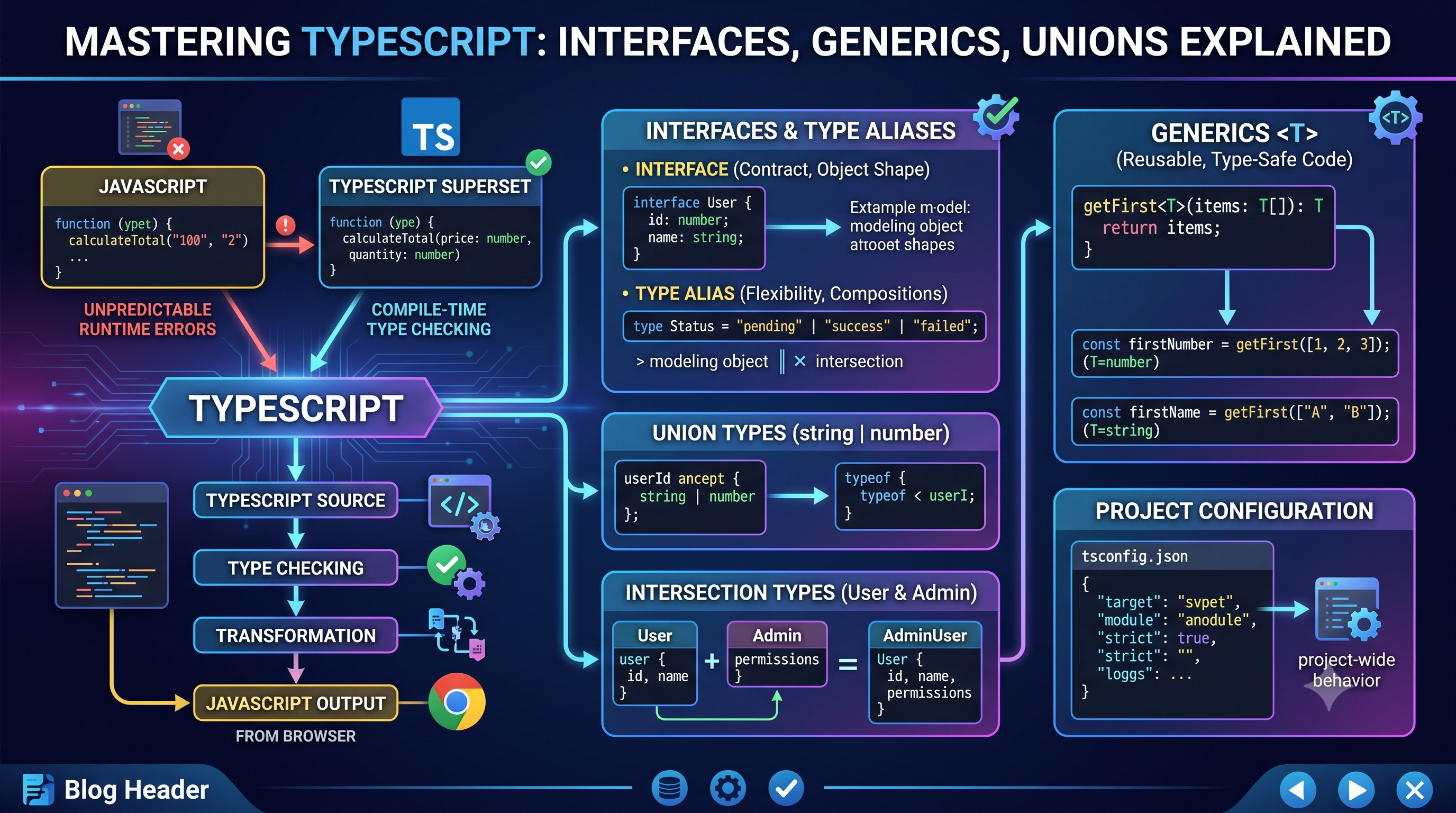
TypeScript addresses this class of problem by adding static typing to JavaScript.
It helps developers identify many mistakes while writing code rather than discovering them only after the application runs.
In this article, we'll build our understanding from the basics and explore type annotations, interfaces, type aliases, unions, intersections, generics, tsconfig.json, and the TypeScript compilation process.
1. Why TypeScript Exists
JavaScript is dynamically typed.
That means a variable can hold different types of values during its lifetime:
let value = 10;

value = "Hello";

value = true;
JavaScript allows this.
That flexibility is useful, but it can become difficult to manage in large codebases.
Imagine an API response:
const user = getUser();

console.log(user.name);
console.log(user.email);
What if email doesn't exist?
What if getUser() returns null?
What if another developer changes the API response from:
email
to:
emailAddress
Some of these problems may only become visible when the application runs.
This is the difference between runtime errors and compile-time errors.
Runtime vs Compile-Time Errors
A runtime error occurs while the program is executing.
For example:
const user = null;

console.log(user.name);
The problem is discovered when the code runs.
TypeScript can catch many similar mistakes earlier.
const user: User = null;
Depending on the project's configuration, TypeScript can report the problem before the code is executed.
This is one of the biggest benefits of static typing.
TypeScript as a Superset of JavaScript
TypeScript is not a completely separate replacement for JavaScript.
It is a superset of JavaScript.
Conceptually:
JavaScript
     +
Static Types
     +
TypeScript Features
     ↓
TypeScript
Valid JavaScript code is generally valid TypeScript code.
TypeScript adds features that help developers describe the structure of their programs.
For example:
function greet(name: string): string {
  return `Hello, ${name}`;
}
The type information helps tools understand how the function should be used.
TypeScript then gets converted into JavaScript before it runs in a browser or JavaScript runtime.
2. Understanding Type Annotations
A type annotation explicitly tells TypeScript what type a value should have.
For example:
let username: string = "Siddhant";
let age: number = 22;
let isAdmin: boolean = false;
Now TypeScript knows:
username → string
age      → number
isAdmin  → boolean
If we try:
age = "twenty two";
TypeScript can report the error during development.
Function Parameter Types
Types can also be applied to function parameters.
JavaScript:
function add(a, b) {
  return a + b;
}
TypeScript:
function add(a: number, b: number): number {
  return a + b;
}
Now the function clearly communicates its contract:
Input:
number + number

Output:
number
This makes the function easier to understand and harder to misuse.
Function Return Types
We can explicitly define the return type:
function getUsername(): string {
  return "Siddhant";
}
The : string indicates that the function should return a string.
If the implementation accidentally returns a number:
function getUsername(): string {
  return 123;
}
TypeScript can detect the mismatch.
Type Inference
TypeScript doesn't require you to annotate everything.
It can often infer types automatically.
For example:
const username = "Siddhant";
TypeScript understands that username is a string.
Similarly:
const age = 22;
TypeScript infers:
age → number
This is called type inference.
Explicit vs Inferred Types
Compare:
const name: string = "Siddhant";
with:
const name = "Siddhant";
Both are type-safe.
The second version relies on inference.
Good TypeScript code usually doesn't mean adding a type annotation to every variable.
Instead:
Add types when they improve clarity or when TypeScript cannot infer the intended type correctly.
3. Interfaces vs Type Aliases
As applications grow, we don't just work with primitive values.
We work with objects such as:
Users
Products
Orders
Payments
API responses
Suppose we have a user:
const user = {
  id: 1,
  name: "Siddhant",
  email: "siddhant@example.com"
};
We can describe its structure using an interface.
interface User {
  id: number;
  name: string;
  email: string;
}
Now:
const user: User = {
  id: 1,
  name: "Siddhant",
  email: "siddhant@example.com"
};
The interface acts as a contract describing the expected structure.
Type Aliases
We can represent the same structure using a type alias:
type User = {
  id: number;
  name: string;
  email: string;
};
For many object modeling scenarios, interfaces and type aliases look very similar.
So what's the difference?
Interfaces
Interfaces are particularly useful for describing the shape of objects and contracts.
They can also be extended:
interface User {
  id: number;
  name: string;
}

interface Admin extends User {
  permissions: string[];
}
Now Admin contains the properties of User plus its own properties.
Type Aliases
Type aliases can represent more than object structures.
For example:
type Status = "pending" | "success" | "failed";
They can also combine types:
type UserWithRole = User & {
  role: string;
};
This flexibility makes type aliases particularly useful for unions, intersections, and other type compositions.
Which One Should You Use?
There isn't a universal rule.
A practical guideline is:
Use interfaces when:
Modeling object shapes
Defining contracts
Designing structures that may be extended
Use type aliases when:
Defining union types
Defining intersection types
Creating aliases for primitive or complex type expressions
Composing multiple types
Both are valuable.
The most important thing is to remain consistent within a project.
4. Union Types
Sometimes a value can legitimately have more than one possible type.
For example, an API might return either a string ID or a numeric ID:
let userId: string | number;
This is a union type.
It means:
userId can be
    ↓
string OR number
We can also use unions with literal values:
type Status = "pending" | "success" | "failed";
Now:
let status: Status = "success";
But:
status = "completed";
would be rejected because "completed" isn't part of the defined union.
Real-World Use Cases
Union types are useful for representing states.
Consider an API request:
type RequestStatus =
  | "idle"
  | "loading"
  | "success"
  | "error";
This makes the possible states explicit.
Another example:
type PaymentMethod =
  | "card"
  | "upi"
  | "netbanking";
Instead of allowing any string, the application defines the valid options.
Handling Unions Safely
Suppose:
function printId(id: string | number) {
  console.log(id);
}
What if we need string-specific behavior?
We can narrow the type:
function printId(id: string | number) {
  if (typeof id === "string") {
    console.log(id.toUpperCase());
  } else {
    console.log(id.toFixed(0));
  }
}
TypeScript understands that inside the if block, id is a string.
This process is called type narrowing.
The important idea is:
A union gives you multiple possibilities, and type narrowing helps you safely determine which possibility you currently have.
5. Intersection Types
Union means:
A OR B
Intersection means:
A AND B
Suppose we have:
type User = {
  id: number;
  name: string;
};

type Admin = {
  permissions: string[];
};
We can combine them:
type AdminUser = User & Admin;
Now AdminUser must contain properties from both types:
const admin: AdminUser = {
  id: 1,
  name: "Siddhant",
  permissions: ["manage_users"]
};
Conceptually:
User
 ├── id
 └── name

     +

Admin
 └── permissions

     ↓

AdminUser
 ├── id
 ├── name
 └── permissions
Intersection types are useful when you want to compose reusable structures.
For example:
type Product = {
  id: number;
  name: string;
};

type Auditable = {
  createdAt: Date;
  updatedAt: Date;
};

type AuditableProduct = Product & Auditable;
Now the resulting type represents a product that also contains audit information.
6. Generic Functions
Generics are one of the most useful TypeScript concepts once you start building reusable code.
Imagine we want a function that returns the first element of an array.
We could write:
function getFirst(items: number[]): number {
  return items[0];
}
But now it only works with numbers.
We could create another function for strings:
function getFirst(items: string[]): string {
  return items[0];
}
This creates repetition.
We want one function that works with different types while still preserving type information.
That's where generics come in.
Generic Type Parameters
We can write:
function getFirst<T>(items: T[]): T {
  return items[0];
}
Here, T represents a type that will be determined when the function is used.
For example:
const firstNumber = getFirst([1, 2, 3]);
TypeScript understands:
T = number
So:
firstNumber → number
With strings:
const firstName = getFirst(["Siddhant", "Rahul"]);
TypeScript understands:
T = string
So:
firstName → string
The same function works for both.
Why Generics Matter
Without generics, we might be tempted to use any:
function getFirst(items: any[]): any {
  return items[0];
}
This works, but it throws away much of TypeScript's type safety.
With generics:
function getFirst<T>(items: T[]): T {
  return items[0];
}
we preserve the relationship between the input and output types.
That's the real power of generics.
Generics allow us to write reusable code without giving up type information.
Generic Constraints
Sometimes we don't want to accept every possible type.
Suppose we want a function that receives an object containing an id.
We can write:
function getId<T extends { id: number }>(item: T): number {
  return item.id;
}
Now TypeScript knows that whatever type T represents must contain:
id: number
This works:
getId({
  id: 1,
  name: "Siddhant"
});
But an object without an id won't satisfy the constraint.
Conceptually:
Generic
   ↓
Can accept many types
   ↓
Constraint
   ↓
But those types must satisfy a requirement
This gives us flexibility without sacrificing safety.
7. Understanding tsconfig.json
Once a TypeScript project grows beyond a few files, you need a way to configure how TypeScript behaves.
That's the purpose of:
tsconfig.json
It defines project-wide TypeScript configuration.
A simple configuration might look like:
{
  "compilerOptions": {
    "target": "ES2022",
    "module": "ESNext",
    "strict": true
  }
}
Why tsconfig.json Matters
Without a shared configuration, different parts of the project could be compiled or checked differently.
tsconfig.json provides a central place to define things such as:
JavaScript version
Module system
Type checking behavior
Output configuration
File inclusion and exclusion
Module resolution
Strict Mode
One of the most important options is:
{
  "compilerOptions": {
    "strict": true
  }
}
Strict mode enables a collection of stronger type-checking behaviors.
This helps catch more potential errors during development.
For example, it encourages you to deal explicitly with situations where a value might be null or undefined.
In large projects, stricter type checking can significantly improve reliability.
Target
The target option determines the JavaScript version TypeScript should generate.
For example:
{
  "compilerOptions": {
    "target": "ES2022"
  }
}
This tells TypeScript what JavaScript language level to target.
The appropriate target depends on the environments where the resulting JavaScript will run.
Module
The module option controls how modules are emitted and handled.
For example:
{
  "compilerOptions": {
    "module": "ESNext"
  }
}
The exact configuration depends on the runtime and build system being used.
Modern web applications often rely on a bundler or framework that handles much of this process.
8. TypeScript Compilation Process
Browsers don't directly execute TypeScript.
They execute JavaScript.
So how does:
const name: string = "Siddhant";
become something a browser can execute?
The TypeScript compiler processes the code.
Conceptually:
TypeScript Source
      ↓
Type Checking
      ↓
Compilation / Transformation
      ↓
JavaScript
      ↓
Browser / Runtime
For example:
function greet(name: string): string {
  return `Hello, ${name}`;
}
can become JavaScript similar to:
function greet(name) {
  return `Hello, ${name}`;
}
The type annotations aren't needed by the JavaScript runtime, so they don't appear in the emitted JavaScript.
TypeScript Is Not Running in the Browser
This distinction is important.
When you write:
const age: number = 22;
the browser doesn't need to understand : number.
The TypeScript tooling checks and transforms the source code before it reaches the browser.
A typical development workflow looks like:
Developer writes TypeScript
          ↓
TypeScript / Build Tool
          ↓
Type checking
          ↓
JavaScript output
          ↓
Browser executes JavaScript
Frameworks such as Next.js and other modern development tools may integrate TypeScript checking and compilation into their own build pipelines.
Bringing Everything Together
We've covered several TypeScript features, but they all solve related problems.
Start with basic types:
const age: number = 22;
Then describe object structures:
interface User {
  id: number;
  name: string;
}
Represent multiple possibilities:
type Status = "loading" | "success" | "error";
Combine structures:
type AdminUser = User & {
  permissions: string[];
};
Build reusable type-safe functions:
function getFirst<T>(items: T[]): T {
  return items[0];
}
And configure the project through:
tsconfig.json
Finally, TypeScript transforms the code into JavaScript that can run in the target environment.
Final Thoughts
TypeScript isn't about adding types everywhere just because you can.
Its real value comes from making code easier to understand, maintain, refactor, and collaborate on.
The progression is straightforward:
JavaScript
    ↓
Type Annotations
    ↓
Interfaces & Type Aliases
    ↓
Unions & Intersections
    ↓
Generics
    ↓
Project Configuration
    ↓
JavaScript Compilation
Interfaces help describe object contracts.
Type aliases provide flexible ways to define and compose types.
Union types represent multiple possible values.
Intersection types combine multiple type structures.
Generics allow reusable code while preserving type information.
And tsconfig.json defines how TypeScript behaves across the project.
The biggest benefit isn't that TypeScript prevents every bug.
It doesn't.
The benefit is that TypeScript moves many problems closer to the moment when the developer writes the code.
Instead of discovering a mistake after the application reaches a user, you can often discover it while building the application.
TypeScript doesn't replace JavaScript. It gives JavaScript developers a better way to reason about the code they're building.