State Management: Context API, Prop Drilling, React.memo, useMemo, and useCallback
Why does managing state become difficult as applications grow?
A small React application can be surprisingly simple.
You might have a component that owns some state, renders a few child components, and passes data where it is needed.
App
 ├── Header
 ├── Main
 └── Footer
But as the application grows, the component tree becomes deeper:
App
 └── Dashboard
      └── Layout
           └── Sidebar
                └── UserProfile
                     └── UserMenu
                          └── Avatar
Now imagine that Avatar needs access to the currently logged-in user.
Should that user data be passed through every component between App and Avatar?
This is where concepts such as prop drilling, Context API, and component memoization become important.
But there is another part of the problem: performance.
As applications become larger, unnecessary renders can make an application more expensive to update than necessary.
Understanding how React renders components is therefore just as important as understanding how state is shared.
Let's build these concepts step by step.
1. Why State Management Becomes Difficult
State is simply data that can change over time and affect what the UI displays.
For example:
const [count, setCount] = useState(0);
The value of count is state.
In a small component, managing state is straightforward.
But real applications have many kinds of state:
Authentication state
User profile information
Theme preferences
Form state
Dashboard filters
Shopping cart data
UI state such as modals and menus
The challenge isn't necessarily creating state.
The challenge is deciding:
Where should the state live, and which components should have access to it?
The Component Tree Problem
Consider a dashboard:
App
 └── Dashboard
      ├── Header
      ├── Sidebar
      └── Content
           └── Profile
                └── Avatar
Suppose the user's name is stored in App, but Avatar needs it.
One approach is to pass it through every component:
App
 ↓ user
Dashboard
 ↓ user
Content
 ↓ user
Profile
 ↓ user
Avatar
The intermediate components may not even care about the user data.
They're simply passing it along.
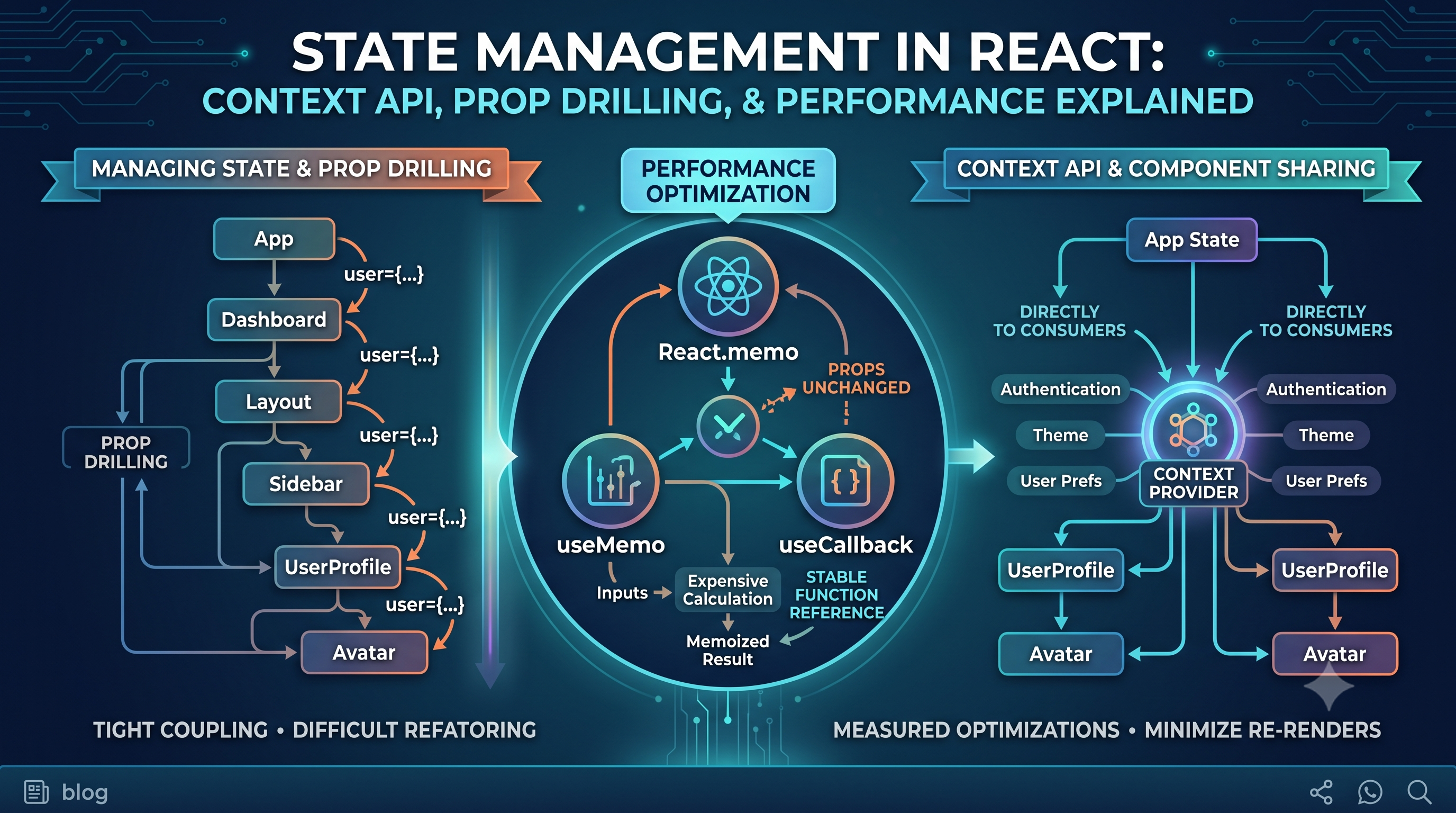
This is called prop drilling.
2. Understanding Prop Drilling
Props are one of React's fundamental mechanisms for passing data from a parent component to a child.
For example:
function Profile({ user }) {
  return <h2>{user.name}</h2>;
}

function App() {
  const user = {
    name: "Siddhant"
  };

  return <Profile user={user} />;
}
This is perfectly normal.
The problem appears when the data needs to travel through many intermediate components.
Consider:
function App({ user }) {
  return <Dashboard user={user} />;
}

function Dashboard({ user }) {
  return <Profile user={user} />;
}

function Profile({ user }) {
  return <Avatar user={user} />;
}

function Avatar({ user }) {
  return <img alt={user.name} />;
}
Dashboard and Profile don't actually use user.
They only forward it.
That's prop drilling.
Why Prop Drilling Can Become a Problem
Deep prop chains can lead to:
More verbose components
Tightly coupled component interfaces
Difficult refactoring
Reduced readability
More maintenance when data requirements change
Imagine changing the shape of the user object.
You may need to modify several components simply because they forward the prop.
However, prop drilling itself is not always bad.
If data only needs to travel through one or two components, passing props explicitly is often the cleanest solution.
The problem isn't:
"Passing props is bad."
The problem is:
"Are components being forced to pass data they don't actually own or use?"
3. The Context API
React provides the Context API for sharing values with components deeper in the component tree without explicitly passing props through every intermediate component.
Instead of:
App
 ↓
Dashboard
 ↓
Profile
 ↓
Avatar
we can make shared data available through a context:
           UserContext
               │
      ┌────────┴────────┐
      ↓                 ↓
 Dashboard           Profile
                        ↓
                      Avatar
The components that need the value can consume it directly.
Provider and Consumer
Context revolves around two main ideas:
Provider
Makes a value available to components below it.
Consumer
A component that reads the context value.
In modern React, context is commonly consumed using the useContext hook.
For example:
const UserContext = createContext(null);

function App() {
  const user = {
    name: "Siddhant"
  };

  return (
    <UserContext.Provider value={user}>
      <Dashboard />
    </UserContext.Provider>
  );
}
A deeply nested component can then access the value:
function Avatar() {
  const user = useContext(UserContext);

  return <img alt={user.name} />;
}
No intermediate component needs to forward the user prop.
4. When Context API Works Well
Context is useful when many components need access to the same relatively stable piece of application-level data.
Common examples include:
Authentication
AuthContext
   ↓
User
Session
Authentication status
Different parts of the application may need to know whether the user is logged in.
Theme
ThemeContext
   ↓
light / dark
Components throughout the application can respond to the selected theme.
User Preferences
For example:
Language
Timezone
Display preferences
Global Application Settings
Configuration that needs to be accessible across multiple parts of the application can also be a good candidate.
Context Doesn't Mean "Global State"
A common misconception is:
"If something is shared, put it in Context."
Not necessarily.
Context is best viewed as a mechanism for making values available to a subtree.
It doesn't automatically make every piece of application state easier to manage.
For example, a form's input value usually doesn't need to be placed in global context.
If only one component uses the state, keep it local.
This leads to an important principle:
Keep state as close as possible to the components that actually need it.
Context becomes useful when moving that state closer would require excessive prop passing.
5. Understanding React Re-renders
Now we move from state sharing to performance.
To understand React.memo, useMemo, and useCallback, we first need to understand re-renders.
Suppose we have:
function App() {
  const [count, setCount] = useState(0);

  return (
    <>
      <button onClick={() => setCount(count + 1)}>
        Increment
      </button>

      <Profile />
    </>
  );
}
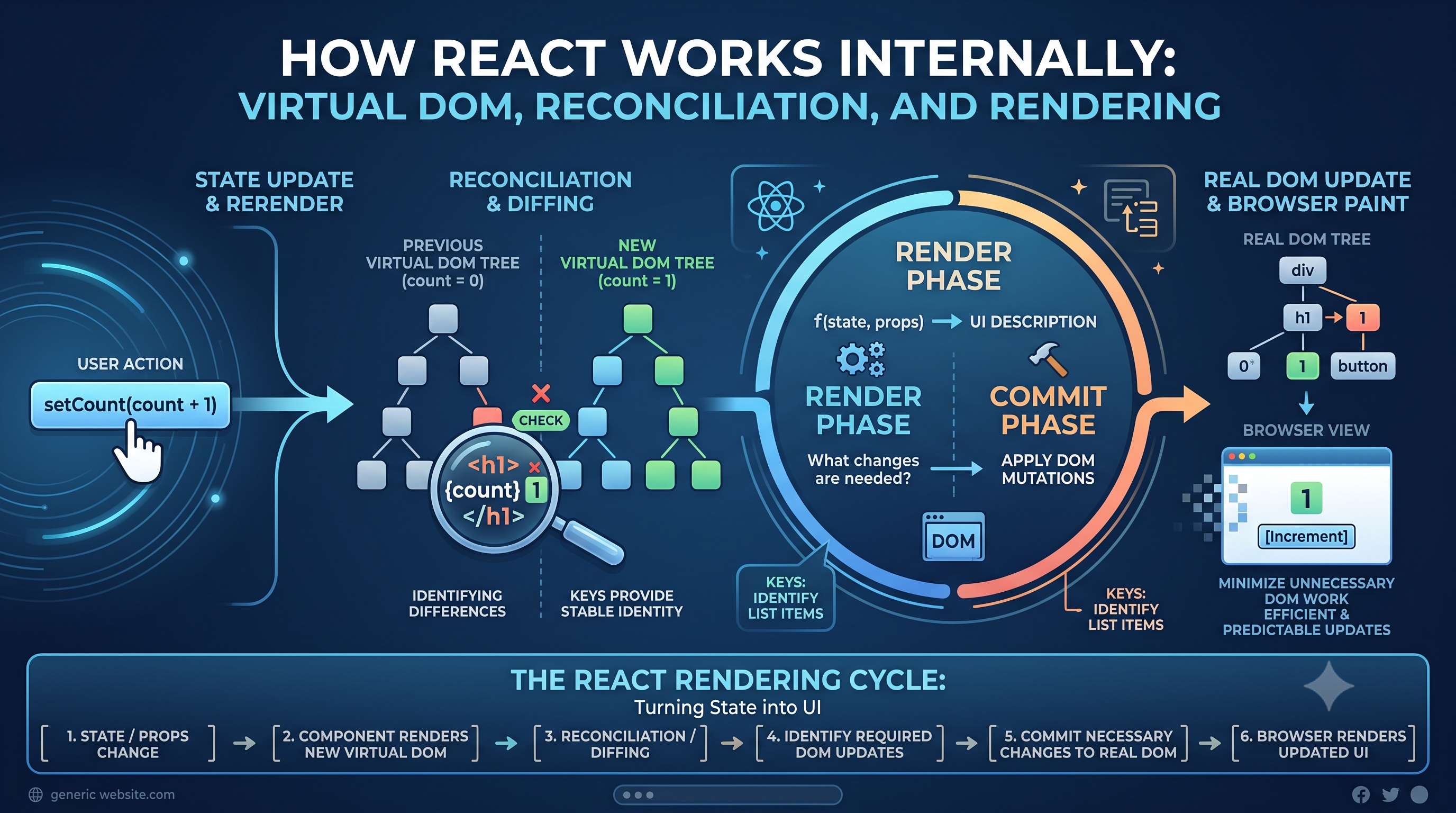
When count changes, App renders again.
What about Profile?
Because Profile is rendered by App, React may render that child as part of processing the updated component tree.
This is normal React behavior.
A re-render does not automatically mean that the browser updates every DOM element.
React determines what changed and commits the necessary DOM updates.
Render vs DOM Update
This distinction is important.
Conceptually:
State Update
     ↓
Component Render
     ↓
React calculates changes
     ↓
DOM updates where necessary
A component rendering again doesn't necessarily mean the entire page is recreated.
React's rendering model is designed to determine what needs to change.
Why Unnecessary Re-renders Matter
Most re-renders are inexpensive.
You should not assume that every additional render is a performance problem.
Problems arise when:
Components are expensive to render
Large component trees update frequently
Expensive calculations happen during rendering
Unnecessary work occurs repeatedly
User interactions become noticeably slower
This is why optimization should be based on actual performance problems rather than assumptions.
6. React.memo
React.memo allows a component to skip rendering when its props have not changed according to its comparison behavior.
Consider:
function Profile({ name }) {
  console.log("Profile rendered");

  return <h2>{name}</h2>;
}
We can memoize it:
const Profile = React.memo(function Profile({ name }) {
  console.log("Profile rendered");

  return <h2>{name}</h2>;
});
Now React can reuse the previous rendered result when the component's props are considered unchanged.
When React.memo Helps
Imagine a dashboard:
Dashboard
 ├── ExpensiveChart
 ├── UserProfile
 ├── ActivityFeed
 └── Settings
Suppose only a small piece of state changes frequently, while ExpensiveChart receives the same props.
Memoizing that expensive component may prevent unnecessary work.
State changes
     ↓
Dashboard renders
     ↓
ExpensiveChart props unchanged
     ↓
Memoized component can skip rendering
When React.memo Can Hurt
Memoization isn't free.
React needs to compare props, and the application becomes slightly more complex.
If a component is tiny and inexpensive, memoizing it may provide little or no benefit.
For example:
function Greeting({ name }) {
  return <h1>Hello, {name}</h1>;
}
Adding memoization here might make the code more complicated without solving a meaningful problem.
This is why:
Memoization should solve a measured problem, not be added everywhere by default.
7. useMemo
useMemo is used to memoize the result of a calculation.
Consider an expensive operation:
const filteredProducts = products
  .filter(product => product.price > 1000)
  .sort((a, b) => b.price - a.price);
If this calculation is expensive and the component renders frequently, we may not want to repeat it when its inputs haven't changed.
We can use:
const filteredProducts = useMemo(() => {
  return products
    .filter(product => product.price > 1000)
    .sort((a, b) => b.price - a.price);
}, [products]);
Now React can reuse the previously calculated result until a dependency changes.
What useMemo Actually Memoizes
useMemo memoizes a value.
Think of it as:
Inputs
  ↓
Expensive Calculation
  ↓
Memoized Result
If the dependencies haven't changed, React can reuse the previous result.
It is particularly useful for expensive calculations such as:
Large data transformations
Complex filtering
Expensive sorting
Derived datasets
Computationally intensive calculations
It is usually unnecessary for simple calculations.
For example:
const total = price * quantity;
Using useMemo here would likely add complexity without providing meaningful value.
8. useCallback
useCallback is related to useMemo, but instead of memoizing a calculated value, it memoizes a function reference.
Consider:
function Dashboard() {
  const handleClick = () => {
    console.log("Clicked");
  };

  return <Profile onClick={handleClick} />;
}
Every time Dashboard renders, a new function reference is created.
Conceptually:
Render 1 → function A
Render 2 → function B
Render 3 → function C
Even if the function behaves exactly the same, its reference is different.
This can matter when passing functions to memoized child components.
We can use useCallback:
const handleClick = useCallback(() => {
  console.log("Clicked");
}, []);
Now React can preserve the function reference between renders as long as its dependencies remain unchanged.
Why useCallback Can Matter with React.memo
Consider:
const Profile = React.memo(function Profile({ onClick }) {
  return <button onClick={onClick}>Open Profile</button>;
});
The parent renders:
function Dashboard() {
  const handleClick = () => {
    console.log("Profile");
  };

  return <Profile onClick={handleClick} />;
}
Even though the logic hasn't changed, a new function is created on each render.
Therefore, the child receives a new onClick reference.
React.memo may not be able to skip the render.
Using useCallback can preserve the reference:
function Dashboard() {
  const handleClick = useCallback(() => {
    console.log("Profile");
  }, []);

  return <Profile onClick={handleClick} />;
}
Now the combination can be useful:
Parent
  ↓
useCallback
  ↓
Stable Function Reference
  ↓
React.memo
  ↓
Child can skip unnecessary rendering
useMemo vs useCallback
The easiest way to remember the difference is:
useMemo
   ↓
Memoizes a value

useCallback
   ↓
Memoizes a function
For example:
const total = useMemo(() => {
  return price * quantity;
}, [price, quantity]);
Here, total is a memoized value.
While:
const handleSubmit = useCallback(() => {
  submitForm();
}, []);
Here, handleSubmit is a memoized function reference.
You can think of useCallback(fn, deps) as a specialized form of memoizing a function reference.
9. Choosing the Right Optimization Strategy
At this point, we have several tools.
But the goal isn't to use all of them.
The goal is to use the simplest solution that solves the actual problem.
Use Props When...
The data has a straightforward parent-child relationship.
Parent
 ↓ props
Child
There is nothing wrong with this.
In fact, explicit data flow is often easier to understand.
Use Context When...
Multiple components within a subtree need the same shared value.
Good examples include:
Authentication
Theme
User preferences
Application configuration
Avoid using Context simply because passing one prop feels inconvenient.
Use React.memo When...
A component:
Renders frequently
Is relatively expensive to render
Receives the same props often
Has a measurable performance benefit from skipping renders
Use useMemo When...
A calculation is genuinely expensive and its inputs don't change on every render.
Don't use it just because a value is being calculated.
Use useCallback When...
You need a stable function reference, particularly when:
Passing callbacks to memoized children
A function is used as a dependency elsewhere
There is a demonstrated performance benefit
10. Scaling React Applications
As a React application grows, performance problems are often architectural problems before they are optimization problems.
Suppose the entire application depends on one large piece of shared state:
                 App State
                    ↓
       ┌────────────┼────────────┐
       ↓            ↓            ↓
    Header      Dashboard     Sidebar
                    ↓
                  Table
                    ↓
                  Row
A small change to the shared state could affect a large part of the component tree.
A better architecture may involve keeping state closer to where it is actually needed.
Application
 ├── Auth State
 ├── Dashboard
 │    └── Dashboard State
 ├── Profile
 │    └── Profile State
 └── Settings
      └── Settings State
This reduces unnecessary coupling.
Think About State Ownership
Whenever you create state, ask:
Who actually owns this state?
If only one component needs it, keep it there.
If several nearby components need it, consider moving it to their closest common parent.
If many components across a subtree need it, Context may be appropriate.
This gives us a useful progression:
Local need
    ↓
Component state

Shared nearby need
    ↓
Lift state up

Shared subtree need
    ↓
Context

Performance issue
    ↓
Measure first

Then consider:
React.memo
useMemo
useCallback
The Bigger Picture
All of these concepts are connected to React's component and rendering model.
Consider this flow:
State changes
      ↓
Component renders
      ↓
Children may render
      ↓
React determines necessary DOM updates
If state is poorly structured, too much of the component tree may need to participate in updates.
If expensive calculations are repeated unnecessarily, rendering becomes more expensive.
If callbacks and object references change unnecessarily, memoized components may lose their ability to skip work.
The solution isn't always another hook.
Sometimes the better solution is to rethink the component architecture.
Final Thoughts
React provides several mechanisms for managing shared data and optimizing rendering, but each solves a different problem.
Prop drilling happens when data is passed through components that don't actually need it.
Context API provides a way to make shared values available to components within a subtree without passing props through every level.
React.memo can prevent unnecessary rendering of components when their props haven't meaningfully changed.
useMemo memoizes the result of a calculation.
useCallback memoizes a function reference.
The important part is knowing when to use each one.
A good React application isn't one that uses useMemo, useCallback, and React.memo everywhere.
It is one where:
State has clear ownership
Data flows are easy to understand
Shared state is used intentionally
Components have reasonable responsibilities
Performance is measured before optimization
Optimizations don't unnecessarily complicate the code
The best optimization is often not a clever hook.
Sometimes it is simply better architecture.
Understand how React renders first. Optimize only when there is something worth optimizing.