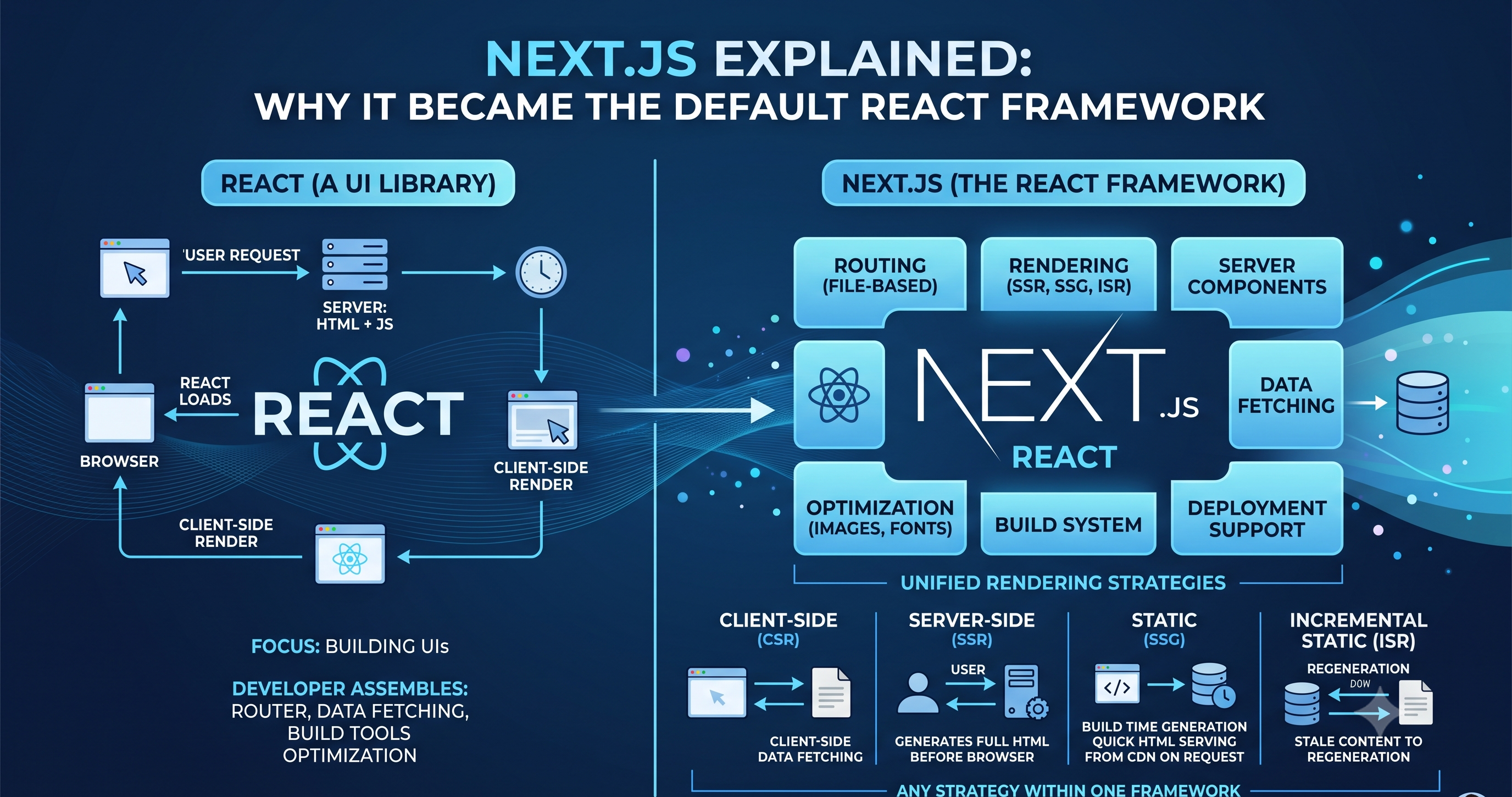
Next.js Explained: Why It Became the Default React Framework
If React can already build modern web applications, why do we need Next.js?
This is one of the first questions developers encounter when moving beyond basic React applications.
React is powerful. It gives developers a component model, a rendering system, and the tools needed to build interactive user interfaces.
But building a production-ready application involves much more than rendering components.
You also need to think about:
Routing
Rendering strategies
SEO
Data fetching
Performance
Caching
Server-side execution
Application structure
Deployment
With React alone, many of these decisions are left to the developer and the surrounding ecosystem.
Next.js emerged as a framework that provides an opinionated architecture around React and brings many of these capabilities together.
But calling Next.js simply "React with extra features" doesn't fully explain why it became so important.
To understand that, we need to understand the problems it was designed to solve.
1. Why Next.js Exists
React was originally focused primarily on building user interfaces.
A basic React application often follows this model:
Browser
   ↓
Download JavaScript
   ↓
React loads
   ↓
Application renders
This approach works extremely well for many applications.
However, it can create challenges when building websites where the initial HTML content matters.
Consider a product page:
https://example.com/products/iphone
A user expects to see the product information quickly.
Search engines also need to understand the content.
If most of the meaningful content is generated only after JavaScript executes in the browser, the application has additional work to do before the page becomes useful.
This doesn't mean client-side rendering is inherently bad.
It means different applications have different rendering requirements.
Growing Application Complexity
As applications grow, developers often need:
React
+
Router
+
Data Fetching
+
Server Rendering
+
Build Tooling
+
Optimization
+
Deployment Configuration
Each individual tool can be excellent.
But now developers have to make architectural decisions about how all these pieces fit together.
Next.js provides a framework that integrates many of these concerns into one development model.
That is the fundamental reason frameworks like Next.js exist.
2. React vs Next.js
Before comparing them, there's an important distinction.
React Is a Library
React primarily focuses on building user interfaces.
You can think of it as:
React
  ↓
UI Components
  ↓
Application Interface
It doesn't attempt to prescribe every aspect of your application architecture.
You can choose your own:
Router
Data-fetching approach
State management solution
Build tools
Backend architecture
This flexibility is valuable.
Next.js Is a Framework
Next.js builds on top of React.
Conceptually:
Next.js
│
├── React
├── Routing
├── Rendering
├── Server Components
├── Data Fetching
├── Optimization
├── Build System
└── Deployment Support
Instead of assembling every major piece yourself, Next.js provides an integrated application framework.
This is the key difference:
React helps you build UI. Next.js provides a framework for building complete React applications.
3. Understanding Rendering Strategies
One of the biggest reasons modern frameworks exist is that applications don't all need to render their pages in the same way.
There are several important rendering strategies.
Client-Side Rendering — CSR
In Client-Side Rendering, the browser receives the application JavaScript and renders much of the UI on the client.
Conceptually:
Request
  ↓
Server
  ↓
HTML + JavaScript
  ↓
Browser
  ↓
React renders UI
This approach is common for highly interactive applications.
Examples include:
Dashboards
Admin panels
Internal tools
Web applications where SEO isn't a major requirement
Server-Side Rendering — SSR
With Server-Side Rendering, the server generates the HTML for a request.
Conceptually:
Request
  ↓
Server
  ↓
Generate HTML
  ↓
Browser
The user can receive meaningful HTML earlier, while JavaScript can later make the page interactive.
SSR can be useful for pages where:
Initial content matters
SEO matters
Data is request-specific
The application benefits from server-side rendering
Static Site Generation — SSG
Static generation means pages are generated ahead of time rather than generated for every request.
Conceptually:
Build Time
    ↓
Generate HTML
    ↓
Deploy
    ↓
User Request
    ↓
Serve Existing HTML
This can be extremely fast for content that doesn't change frequently.
Examples include:
Documentation
Blogs
Marketing pages
Product information pages
Incremental Static Regeneration — ISR
What if content is mostly static but changes occasionally?
Regenerating the entire website for every content update isn't ideal.
ISR provides a model where statically generated content can be updated over time without requiring a full rebuild of the entire application.
Conceptually:
Static Page
    ↓
Content becomes stale
    ↓
Page regenerated
    ↓
Updated version served
This is useful for applications with large amounts of content that changes periodically.
Why Do Multiple Strategies Exist?
Because applications have different requirements.
Consider:
| Application | Useful Strategy |
|---|---|
| Blog | SSG / ISR |
| E-commerce | SSR / SSG / ISR |
| Dashboard | CSR |
| Marketing website | SSG / SSR |
| Personalized application | SSR / CSR |
There isn't one universally best rendering strategy.
The important architectural question is:
Where and when should the UI be rendered?
Next.js gives developers multiple options within the same framework.
4. File-Based Routing
Traditional routing often requires explicitly defining routes.
Conceptually:
router.get("/products", ...)
router.get("/products/:id", ...)
router.get("/about", ...)
As an application grows, managing route definitions separately can become cumbersome.
Next.js introduced a file-system-based approach.
For example:
app/
├── page.tsx
├── about/
│   └── page.tsx
└── products/
    ├── page.tsx
    └── [id]/
        └── page.tsx
The folder structure reflects the URL structure.
Conceptually:
app/page.tsx
      ↓
/

app/about/page.tsx
      ↓
/about

app/products/page.tsx
      ↓
/products

app/products/[id]/page.tsx
      ↓
/products/:id
This makes routing easier to understand because the application structure and URL structure are closely related.
Dynamic Routes
Suppose an e-commerce application has:
/products/101
/products/102
/products/103
Instead of creating separate files for every product, we can use a dynamic segment:
products/
└── [id]/
    └── page.tsx
Now the same page structure can represent different product IDs.
This is particularly useful for:
Product pages
Blog posts
User profiles
Documentation pages
5. Layouts and Application Structure
Imagine an application with:
Navbar
Sidebar
Main Content
Footer
You don't want to recreate the same structure for every page.
Layouts solve this problem.
Conceptually:
Root Layout
│
├── Navbar
│
├── Sidebar
│
└── Page Content
Different pages can then share the same layout.
Nested Layouts
Large applications often have different sections.
For example:
Application
│
├── Marketing
│    ├── Home
│    ├── About
│    └── Pricing
│
└── Dashboard
     ├── Overview
     ├── Analytics
     └── Settings
The dashboard might have its own layout:
Dashboard Layout
├── Sidebar
├── Header
└── Page Content
while the marketing section uses a completely different layout.
This makes large applications easier to organize.
6. The App Router
Modern Next.js applications use the App Router.
It is based around the app directory and introduces a routing architecture designed around modern React capabilities.
For example:
app/
├── layout.tsx
├── page.tsx
├── dashboard/
│   ├── layout.tsx
│   ├── page.tsx
│   └── settings/
│       └── page.tsx
└── products/
    └── [id]/
        └── page.tsx
The directory structure itself communicates a lot about the application.
The App Router also works closely with:
Server Components
Nested layouts
Streaming
Server-side data access
Modern React rendering patterns
This is one of the major reasons Next.js is more than just a routing library.
7. Server Components vs Client Components
One of the most important concepts in modern Next.js is the distinction between Server Components and Client Components.
The key question is:
Where should this component execute?
Server Components
Server Components execute on the server.
They are useful when a component:
Fetches data
Accesses server-side resources
Doesn't require browser interactivity
Doesn't need client-side state
Conceptually:
Server
  ↓
Server Component
  ↓
Rendered UI
  ↓
Browser
A major advantage is that not every component needs to send its JavaScript logic to the browser.
Client Components
Some UI requires browser-side behavior.
For example:
Button click
Form interaction
useState
useEffect
Browser APIs
These situations require a Client Component.
A Client Component can be explicitly marked using:
"use client";
For example:
"use client";

import { useState } from "react";

export default function Counter() {
  const [count, setCount] = useState(0);

  return (
    <button onClick={() => setCount(count + 1)}>
      Count: {count}
    </button>
  );
}
The important point is not that Server Components are "better" than Client Components.
They solve different problems.
The Architectural Idea
A modern Next.js application might look like:
Page
│
├── Server Component
│    └── Fetch product data
│
├── Server Component
│    └── Render product information
│
└── Client Component
     └── Add to Cart interaction
The server handles what can be done on the server.
The browser handles what actually requires interactivity.
This can reduce unnecessary client-side JavaScript.
8. Data Fetching in Next.js
Traditional React applications often fetch data from the browser.
Conceptually:
Browser
  ↓
React loads
  ↓
API request
  ↓
Server
  ↓
Data
  ↓
Update UI
This can work well, but it means the browser has to perform additional work.
With modern Next.js, data can often be fetched on the server as part of rendering.
Conceptually:
User Request
     ↓
Next.js Server
     ↓
Fetch Data
     ↓
Render UI
     ↓
Browser
This can be particularly useful when the data doesn't need to be fetched directly from the user's browser.
Reducing Client-Side Work
Imagine a product page.
Instead of:
Browser
 ↓
Download JavaScript
 ↓
Execute React
 ↓
Fetch product
 ↓
Render product
server-side data access can allow:
Request
 ↓
Server
 ↓
Fetch product
 ↓
Render product
 ↓
Browser
The exact behavior depends on the application's rendering and caching configuration, but the architectural benefit is clear:
Not every piece of application work needs to happen inside the browser.
9. Performance Benefits of Next.js
Performance is another major reason Next.js became popular.
However, it's important to avoid the misconception that simply using Next.js automatically makes every application fast.
Performance depends on architecture and implementation.
Next.js provides tools and capabilities that make good performance easier to achieve.
Faster Initial Content
Server rendering and static generation can allow users to receive meaningful HTML without waiting for the entire client-side application to initialize.
This can improve the perceived loading experience.
Reduced Client-Side JavaScript
With Server Components, components that don't require browser-side interactivity don't necessarily need to ship their full component logic to the browser.
Less unnecessary JavaScript can mean:
Less downloading
Less parsing
Less execution
Less work for the browser
Asset Optimization
Next.js also provides built-in mechanisms for optimizing common web assets such as images and fonts.
For example, the framework's image optimization capabilities can help deliver appropriately sized images instead of blindly serving large original files.
Core Web Vitals
Modern web performance isn't only about how quickly something technically loads.
Metrics such as:
Largest Contentful Paint
Interaction to Next Paint
Cumulative Layout Shift
help describe the user's experience.
A framework can provide useful defaults and optimizations, but developers still need to design and implement applications carefully.
10. When to Use Next.js
Next.js is particularly useful when an application needs a combination of React UI and broader application capabilities.
Marketing Websites
Marketing websites often care about:
SEO
Fast initial rendering
Content delivery
Performance
Next.js is a strong fit because pages can be statically generated or rendered on the server.
SaaS Products
SaaS applications often combine:
Public pages
+
Authentication
+
Dashboard
+
Server-side logic
+
Interactive UI
Next.js can provide a unified architecture for these different requirements.
E-Commerce
E-commerce applications benefit from:
SEO-friendly product pages
Dynamic routes
Server-side data access
Fast initial content
Interactive client-side features
A product page might therefore combine server and client components.
Content-Heavy Applications
Blogs, documentation platforms, news websites, and publishing platforms often have large amounts of content.
Static generation and incremental regeneration can be particularly useful in these scenarios.
Enterprise Applications
Large applications benefit from:
Clear routing
Shared layouts
Server-side capabilities
Consistent architecture
Performance tooling
Next.js can provide a standardized foundation for these applications.
11. When React Alone May Be Enough
Next.js isn't automatically the correct choice for every React application.
Sometimes React alone is perfectly reasonable.
Internal Tools
Consider an internal company dashboard used by employees.
SEO probably doesn't matter.
The application may simply need:
Login
 ↓
Dashboard
 ↓
Data
 ↓
Interactions
Client-side rendering may be completely sufficient.
Small Projects
If you're building a small application or experimenting with an idea, introducing a full framework may add complexity you don't need.
React with a simple build setup can be enough.
Learning Projects
When learning React, starting with React itself can actually be beneficial.
It allows you to understand:
Components
Props
State
Rendering
Events
before introducing framework-specific concepts.
SPA-Focused Applications
If your application is primarily a single-page application and doesn't require server rendering or advanced framework capabilities, a React-based SPA can still be an excellent choice.
The important thing is to choose architecture based on requirements rather than popularity.
12. The Future of React Development
The React ecosystem has increasingly moved toward applications that combine:
Client
+
Server
+
Streaming
+
Server Components
+
Modern Rendering
This represents a broader shift in frontend development.
The browser is no longer necessarily responsible for everything.
Modern React applications can divide responsibilities between the server and the client.
Full-Stack React
Historically, developers often thought about applications like this:
Frontend
   ↓
API
   ↓
Backend
   ↓
Database
Modern frameworks increasingly allow parts of the application to be developed within a unified framework.
Conceptually:
Next.js Application
│
├── UI
├── Server Components
├── Server Logic
├── Data Access
└── API / Backend Capabilities
This doesn't mean traditional backend systems are disappearing.
Instead, the boundary between frontend and backend development has become more flexible.
Why Next.js Became So Popular
So, why did Next.js become one of the dominant choices for React application development?
Not because React stopped being useful.
Rather, applications started demanding more than UI components.
Developers needed:
React
+
Routing
+
SEO
+
Server Rendering
+
Data Fetching
+
Performance
+
Application Architecture
Next.js brought many of these concerns together.
Its biggest advantage is not a single feature.
It is the integration of multiple architectural capabilities into one React framework.
Final Thoughts
React changed how developers think about building user interfaces by introducing components and declarative rendering.
Next.js builds on that foundation and extends it into a broader application framework.
The progression looks like this:
React
  ↓
Components
  ↓
Application Complexity
  ↓
Routing + Rendering + Data Fetching
  ↓
Next.js
  ↓
Modern Full-Stack React Applications
The important lesson isn't:
"Always use Next.js."
It's:
Choose the rendering strategy and architecture based on the application's requirements.
For a content-heavy website, SEO-driven product, or full-stack SaaS application, Next.js can provide significant advantages.
For a small internal dashboard or straightforward SPA, React alone may be more than enough.
Understanding the difference is more valuable than blindly choosing one technology over another.
Next.js didn't replace React.
It expanded what developers can build around React.